Showing posts with label Solution. Show all posts

27 November 2014

Sitecore 7.5 and Installing Packages through handler is broken


I was upgrading a 7.2 to 7.5 today and I noticed something unexpected that I wanted to share today.

As maybe a few of you, I am using TDS to generate my update packages for my deployments. This is awesome and We have a .ashx on our QA environment that automatically install those packages and publish items afterwards. Well, this was quite nice and working fine on Sitecore 7.2.

However, after upgrading the site to 7.5 I noticed that the solution was not compiling against the new Sitecore DLL.. And the reason was: SaveInstallationMessages() method was removed from the UpdateHelper on the Sitecore 7.5. So the following line was failing:

                    UpdateHelper.SaveInstallationMessages(entries, text);


If you compare the previous version of the Install() method from Sitecore.Update.InstallUpdatePackage

protected string Install()
{
 string result;
 using (new ShutdownGuard())
 {
  this.logEntries = new List();
  PackageInstallationInfo installationInfo = this.GetInstallationInfo();
  string text = null;
  List entries = null;
  try
  {
   this.WriteMessage(string.Format("{0} package: {1}", (installationInfo.Action == UpgradeAction.Preview) ? "Analyzing" : "Installing", installationInfo.Path), null, Level.INFO, false);
   entries = UpdateHelper.Install(installationInfo, this, out text);
  }
  catch (PostStepInstallerException ex)
  {
   entries = ex.Entries;
   text = ex.HistoryPath;
   throw ex;
  }
  finally
  {
   UpdateHelper.SaveInstallationMessages(entries, text);
  }
  result = text;
 }
 return result;
}

With the new version:

// Sitecore.Update.InstallUpdatePackage
protected string Install()
{
 string result;
 using (new ShutdownGuard())
 {
  this.logEntries = new List();
  PackageInstallationInfo installationInfo = this.GetInstallationInfo();
  string text = null;
  this.logMessages = new List();
  try
  {
   this.WriteMessage(string.Format("{0} package: {1}", (installationInfo.Action == UpgradeAction.Preview) ? "Analyzing" : "Installing", installationInfo.Path), null, Level.INFO, false);
   this.logMessages = UpdateHelper.Install(installationInfo, this, out text);
   base.InstallationHistoryRoot = text;
  }
  catch (PostStepInstallerException ex)
  {
   this.logMessages = ex.Entries;
   base.InstallationHistoryRoot = ex.HistoryPath;
   throw ex;
  }
  finally
  {
   this.SaveInstallationMessages();
  }
  result = text;
 }
 return result;
}

You can notice the SaveInstallationMessages is now defined on the control itself. This is a bit annoying as we cant re-use it in our handler anymore.
Since the UpdateHelper.Install is still outing the history path I could go around the issue by adding the SaveInstallationMessages() into our handler directly but that means duplication of methods. I would have prefered the old static method, but I could not find any other way for now...

        protected string Install(string package)
        {
            var log = LogManager.GetLogger("LogFileAppender");
            string result;
            using (new ShutdownGuard())
            {
                var installationInfo = new PackageInstallationInfo
                {
                    Action = UpgradeAction.Upgrade,
                    Mode = InstallMode.Install,
                    Path = package
                };
                string text = null;
                List entries = null;
                try
                {
                    entries = UpdateHelper.Install(installationInfo, log, out text);
                }
                catch (PostStepInstallerException ex)
                {
                    entries = ex.Entries;
                    text = ex.HistoryPath;
                    SC.Diagnostics.Log.Error("Automated Deployment error " + ex.StackTrace, "Automated deployment");
                    throw;
                }
                finally
                {
                    this.SaveInstallationMessages(entries, text);
                }

                result = text;
            }

            return result;
        }

        public string SaveInstallationMessages(System.Collections.Generic.List entries, string historyPath)
        {
            string text = System.IO.Path.Combine(historyPath, "messages.xml");
            FileUtil.EnsureFolder(text);
            using (System.IO.FileStream fileStream = System.IO.File.Create(text))
            {
                XmlEntrySerializer xmlEntrySerializer = new XmlEntrySerializer();
                xmlEntrySerializer.Serialize(entries, fileStream);
            }
            return text;
        }

11 May 2014

Using Dictionary for static string


Just a quick post today to talk abut Dictionaries.

I have seen quite a lots of code where we always have some text floating around in either ascx or cshtml. Usually people tells me that this text will never be updated... Ever... and in that case why should we worry about it. I know it is unlikely but when it does happen and the client wants to update the text then that means deployment: TEST > UAT > PROD. Well I have to admit that when I started with Sitecore 6 years ago, I did not know what to do with those neither so we usually placed them as a field in items but tricky for re-usability :)

Anyway, since 6.6, it does not really take long to cater for it. A simple way is o use the dictionary in Sitecore.

Here is a quick view on how you can setup your text and retrieve it...

You can create a new dictionary item such as:

Also it is better if you create some kind of a struture under Dictionary: A, B, C, D... Now on the code side you can retrieve the value by doing something like:


OK. That is the easiest use.
Now from Sitecore 6.6 there is a concept of domain dictionary which is even better if you have multiple sites running on the same sitecore instance. Indeed, it would be so easier to separate each dictionary for each site. Also, a great thing about domain dictionary is if you have all component as modular: Navigation is one module, banner is another one... then you could even think about having a dictionary per module...

So here we go, the first thing you need to do is to create a Sitecore Dictionary Domain on your website. The template you will use is: /sitecore/templates/System/Dictionary/Dictionary Domain
Under this item, you can create a folder and/or a dictionary item...


Now before being able to use it, you will need to define your dictionary domain for your site. For that, you can open the web.config or your specific config in the include folder. Then locate your site definition. If you look at the definition you will see that you can add a new attribute "dictionaryDomain":

              dictionaryDomain: The default domain to use when looking up dictionary phrases for the website. If a phrase does not exist in
                                this dictionary domain, Sitecore attempts to locate that phrase in the default dictionary domain - 
                                /sitecore/system/Dictionary in the current database. If the phrase cannot be found in the default dictionary
                                domain, Sitecore attempts to locate that phrase in the default dictionary domain in the Core database, if that
                                database exists.
                                You can override the site-specific dictionary domain by passing parameters to the Translate.Text() method.


So go ahead and locate your site entry and add the dictionaryDomain="My Site Dictionary":
        
On the code side, you can now retrieve the value by using either of the following:


19 March 2014

Solution version number accross multiple projects


On this post, I wanted to talk about version number. Most of our solution contains multiple projects and modifying the version number on multiple project is never the great.


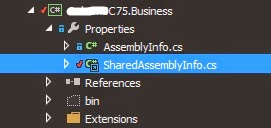
So one of the solution could be to have a SharedAssemblyInfoFile which will be used across all the projects.

To do that, the first thing will be to create a File SharedAssemblyInfo.cs file on your main project - the project containing your sitecore files: Views...


Here is the content of the SharedAssemblyInfoFile:
using System.Reflection;
using System.Runtime.CompilerServices;
using System.Runtime.InteropServices;

[assembly: AssemblyCompany("My Company")]
[assembly: AssemblyCopyright("Copyright ©  2014")]
[assembly: AssemblyTrademark("")]
// Version information for an assembly consists of the following four values:
//
//      Major Version
//      Minor Version 
//      Build Number
//      Revision
//
// You can specify all the values or you can default the Revision and Build Numbers 
// by using the '*' as shown below:
[assembly: AssemblyVersion("0.0.0.1")]
[assembly: AssemblyFileVersion("0.0.0.1")]

You can then create a link to an exsiting item for all the other project:

 When adding the existing item, do not forget to select add as link:


Once added, you can move the .cs into the property folder:


Now all your project assembly number will be updated in noe place under your main project...